Wednesday, 8 October 2014

Hop In Tally - Excel to Tally.ERP 9 App for Payment Entries


SHORT INTRODUCTION: 

APPLICATION NAME: 

HOP IN TALLY

FUNCTIONALITY: 

IMPORT PAYMENT ENTRIES FROM EXCEL TO TALLY (IN A NUTSHELL ITS A PROTOTYPE TALLY.ERP 9 INTEGRATION UTILITY)

TECHNOLOGY: 

CORE JAVA 

DATABASE TECHNOLOGY: 

<NOT APPLICABLE>

DEVELOPER: 

SUNEET K. CHAUDHARY


Dear All,


This is an app to import payment entries to tally from excel (.xls) file.


Downloading

Click here to download the 'Hop In Tally' App.
Also, Click here to check the JVM requirements.


Extracting 

Folders

Excel format

Hey! Remember your excel sheet to be imported must not contain the following characters:
  • &
  • "
  • '
  • <


Excel Path Mapping


Click on Check Connection and Import


Sunday, 27 July 2014

Bulk Mailing App. From Any Excel Sheet Format


SHORT INTRODUCTION: 

APPLICATION NAME: 

SPACETIME APP. 


FUNCTIONALITY: 

BULK EMAILING FROM ANY EXCEL SHEET FORMAT


TECHNOLOGY: 

CORE JAVA 


DATABASE TECHNOLOGY: 

<NOT APPLICABLE>


DEVELOPER: 

SUNEET K. CHAUDHARY


Dear Folks,

This App is been developed for making bulk emails with attachment from and given excel sheet. You may have an excel sheet containing list of recipients from where you can mail them by selection the appropriate sheet, columns, from row & to row.

THE BIGGEST ADVANTAGE IS THAT YOU DON'T NEED TO HAVE A SPECIFIED EXCEL FORMAT. ANY EXCEL FORMAT SHALL DO.

Click Here and download SpaceTimeApp.zip
Also, Click Here and download suitable Java Environment for the above App. to run. 

Enter credentials and press 'submit' button:

Log In:

Select Excel file:


Select 'Sheet No.', 'Column No.', 'From Row' and 'To Row':


Select multiple attachments then write subject & body & click on 'send' button :


Apart from the above you also have a 'html/plain' writer:


Saturday, 24 May 2014

URL COSMOS APP (Store, Retrieve & Open Website, Folders, FTP & Desktop App URL Categorically)


Introduction


SHORT INTRODUCTION:


NAME:

URL COSMOS


FUNCTIONALITY: 

URL MANAGEMENT (IT ACTS AS A REPLACEMENT OF WINDOWS SHORTCUT) 


TECHNOLOGY: 

CORE JAVA


DATABASE TECHNOLOGY: 

SQLLITE


DEVELOPER: 

SUNEET K. CHAUDHARY


Dear Folks,

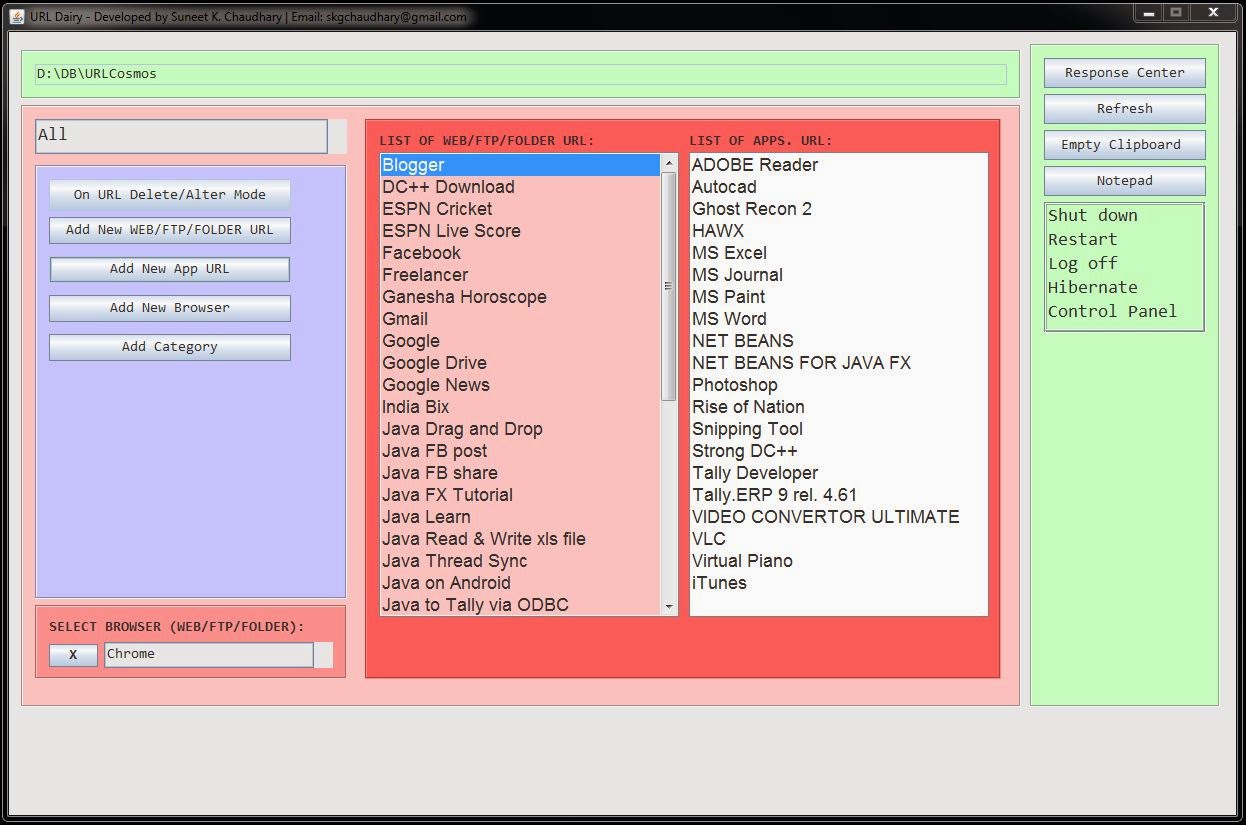
I thought you might like use a very simple app made in Java by me as a hobbyist. Hence this page contains all about the implementation of 'URL Cosmos' (a. k. a. URL Dairy) which is a simple URL dairy. 

URL DAIRY certainly has the following features:

1. Storing and Retrieving Web & App. URLs. (Primary functionality)

2. Categorizing different Website & Application URLs.

3. Building your own category.

4. Ability to open Web URLs on browsers of your own choice. (Multiple Browser adding).

5. EMAIL URL directly from the app.

6. Apart from the above, it has some minor yet useful functionality like,


Shut down

Restart 

Log off

Hibernate

Control Panel

Ping IP

Google Search


Tutorials


Downloading

Click Here and download URLCosmos.zip

Also, Click Here and download suitable Java Environment for the above App. to run. 

Wednesday, 27 March 2013

Read Inbox in Java (through IMAP host)


The following is a simple Java code for reading inbox mails of Yahoo from Internet Messaging Access Protocol  or IMAP host for Yahoo.
Caution: The application downloads entire inbox to your desktop application on the console screen.
So be careful as it takes long time for more number of emails.
You may further enhance the following code to download only unread emails.
Java code for filtering the unread emails will be published soon  . 

package inbox;

import java.io.BufferedReader;
import java.io.IOException;
import java.io.InputStreamReader;

import java.util.Properties;

import javax.mail.Flags;
import javax.mail.Folder;
import javax.mail.Message;
import javax.mail.MessagingException;
import javax.mail.NoSuchProviderException;
import javax.mail.Session;
import javax.mail.Store;
import javax.mail.search.FlagTerm;


/**
 *
 * @author SUNEET
 */
public class Inbox {

    /**
     *
     * @param args the command line arguments
     */
    public static void main(String[] args) throws MessagingException, IOException {
        // TODO code application logic here
        Properties props = System.getProperties();
        props.setProperty( "mail.transport.protocol", "smtps");
        try {
                Session session = Session.getDefaultInstance(props, null);
                Store store = session.getStore("imaps");

                // IMAP host for yahoo.
                // Replace <username> with the valid username of your Email ID.
                // Replace <password> with a valid password of your Email ID.              
                // IMAP host for yahoo.
                store.connect("imap.mail.yahoo.com", "<username>", "<password>");

                System.out.println(store);
             
                Folder inbox = store.getFolder("Inbox");
                inbox.open(Folder.READ_ONLY);
             
                BufferedReader optionReader = new BufferedReader(new InputStreamReader(System.in));
                showAllMails(inbox);
             
        } catch (NoSuchProviderException e) {
            System.out.println(e.toString());
            System.exit(1);
        } catch (MessagingException e) {
            System.out.println(e.toString());
            System.exit(2);
        }

    }  
 
 
    static public void showAllMails(Folder inbox){
        try {
            Message msg[] = inbox.getMessages();
            System.out.println("MAILS: "+msg.length);
            for(Message message:msg) {
                try {
                    System.out.println("DATE: "+message.getSentDate().toString());
                    System.out.println("FROM: "+message.getFrom()[0].toString());          
                    System.out.println("SUBJECT: "+message.getSubject().toString());
                    System.out.println("CONTENT: "+message.getContent().toString());
                    System.out.println("******************************************");
                } catch (Exception e) {
                    System.out.println("No Information");
                }
            }
        } catch (MessagingException e) {
            System.out.println(e.toString());
        }
    }
}

Saturday, 26 January 2013

Send SMTP E-Mail in Java

This post will give you the understanding of very basic Java required to send SMTP e-mail.
You basically need to download (click here) "mail-1.4.jar".
Link the "mail-1.4.jar" file to your library: (See pic below)
Compile the following java code:

import java.util.Properties;
import javax.mail.Message;
import javax.mail.MessagingException;
import javax.mail.PasswordAuthentication;
import javax.mail.Session;
import javax.mail.Transport;
import javax.mail.internet.InternetAddress;
import javax.mail.internet.MimeMessage;


/**
 *
 * @author SUNEET
 */
public class Web {

    /**
     * @param args the command line arguments
     */
   public static void main(String[] args) {                
final String username = "s_lady@rocketmail.com";
final String password = "Password";
                //set properties
Properties props = new Properties();
props.setProperty( "mail.transport.protocol", "smtps");
                props.put("mail.smtp.auth", "true");
                props.put("mail.smtp.host", "plus.smtp.mail.yahoo.com");
                props.put("mail.smtp.port", "465");
                props.put("mail.smtp.socketFactory.class", "javax.net.ssl.SSLSocketFactory");
                props.put("mail.smtp.ssl","true");
                props.put("mail.stmp.user", "username");
                props.put("mail.smtp.password", "password");
                //password authetication
Session session = Session.getInstance(props,
 new javax.mail.Authenticator() {
protected PasswordAuthentication getPasswordAuthentication() {
return new PasswordAuthentication(username, password);
}
 });
                //send e-mail
try {

Message message = new MimeMessage(session);
message.setFrom(new InternetAddress("s_lady@rocketmail.com"));
message.setRecipients(Message.RecipientType.TO,
InternetAddress.parse("s_lady@rocketmail.com"));
message.setSubject("Test mail");
message.setText("Dear reciever,"
+ "\n\n No spam to my email, please!");

Transport.send(message);

System.out.println("Email Sended.");

} catch (MessagingException e) {
throw new RuntimeException(e);
}
}
}


Friday, 9 November 2012

Tally ERP 9's Web Service Architecture (Introduction to JAVA to Tally Integration)


Are you looking for finding out ways to connect your application with Tally database. Well if so then this is the right page which will introduce you to Tally's Web Service Architecture which is the best way to integrate Tally with outside technology.
However before you go further with the introduction, my assumption is that you already know basics of Tally along with Tally's XML schema and if not then watch the following video for the basic idea of Tally's XML:

Alternate link

The following is a working java code which sends a payment voucher to Tally database through SOAP request into the Web Service Architecture of Tally and fetches a response from Tally indicating the action taken by Tally for the request in XML format.
Check it out.


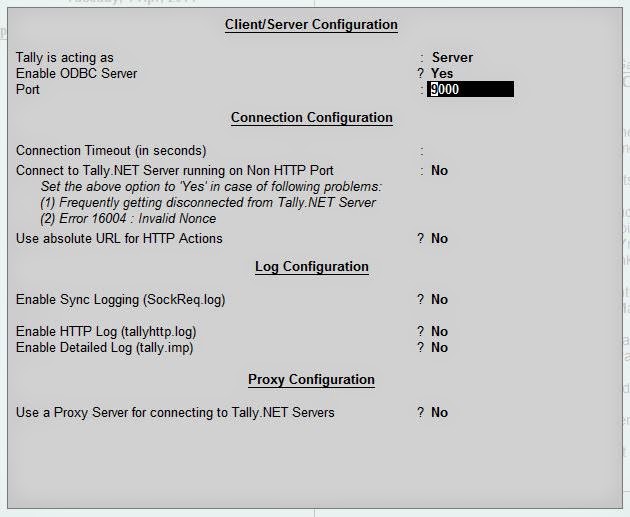
1: Go to "Gateway of Tally >> F12 Configure >> Advanced Configuration" settings (Some initial settings needed to be done inside Tally)


2: Request by the Java application code

package tallyrequest;

import java.io.*;
import java.net.*;

/**
 *
 * @author SUNEET
 */
public class TallyRequest{
   
    public String CreateRequest()
    {             
        String TXML = null;

        TXML = "<ENVELOPE>"
                + "<HEADER><TALLYREQUEST>Import Data</TALLYREQUEST></HEADER>"
                + "<BODY>"
                + "<IMPORTDATA>"
                + "<REQUESTDESC><REPORTNAME>Vouchers</REPORTNAME><STATICVARIABLES><SVCURRENTCOMPANY>Company</SVCURRENTCOMPANY></STATICVARIABLES></REQUESTDESC>"
                + "<REQUESTDATA>"
                + "<TALLYMESSAGE xmlns:UDF=\"TallyUDF\">"
                + "<VOUCHER REMOTEID=\"00000001\" VCHTYPE=\"Receipt\" ACTION=\"Create\" OBJVIEW=\"Accounting Voucher View\">"      
                + "<DATE>20140401</DATE>"
                + "<VOUCHERTYPENAME>Receipt</VOUCHERTYPENAME>"
                + "<VOUCHERNUMBER>1</VOUCHERNUMBER>"
                + "<PARTYLEDGERNAME>Cash</PARTYLEDGERNAME>"
                + "<PERSISTEDVIEW>Accounting Voucher View</PERSISTEDVIEW>"      
                + "<ALLLEDGERENTRIES.LIST>"
                + "<LEDGERNAME>Capital Account</LEDGERNAME>"
                + "<ISDEEMEDPOSITIVE>No</ISDEEMEDPOSITIVE>"
                + "<AMOUNT>50000.00</AMOUNT>"       
                + "</ALLLEDGERENTRIES.LIST>"
                + "<ALLLEDGERENTRIES.LIST>"      
                + "<LEDGERNAME>Cash</LEDGERNAME>"
                + "<ISDEEMEDPOSITIVE>Yes</ISDEEMEDPOSITIVE>"
                + "<AMOUNT>-50000.00</AMOUNT>"          
                + "</ALLLEDGERENTRIES.LIST>"    
                + "</VOUCHER>"
                + "</TALLYMESSAGE>"
                + "</REQUESTDATA>"
                + "</IMPORTDATA>"
                + "</BODY>"
                + "</ENVELOPE>";
        return TXML;
    }
   
    public void SendToTally() throws Exception{
        String Url = "http://127.0.0.1:9000/";      

        String SOAPAction = "";
       
        String Voucher = this.CreateRequest();

// Create the connection where we're going to send the file.
        URL url = new URL(Url);
        URLConnection connection = url.openConnection();
        HttpURLConnection httpConn = (HttpURLConnection) connection;

       
        ByteArrayInputStream bin = new ByteArrayInputStream(Voucher.getBytes());
        ByteArrayOutputStream bout = new ByteArrayOutputStream();

// Copy the SOAP file to the open connection.
       
        copy(bin, bout);     

        byte[] b = bout.toByteArray();

// Set the appropriate HTTP parameters.
        httpConn.setRequestProperty("Content-Length", String.valueOf(b.length));
        httpConn.setRequestProperty("Content-Type", "text/xml; charset=utf-8");
        httpConn.setRequestProperty("SOAPAction", SOAPAction);
        httpConn.setRequestMethod("POST");
        httpConn.setDoOutput(true);
        httpConn.setDoInput(true);

// Everything's set up; send the XML that was read in to b.
        OutputStream out = httpConn.getOutputStream();
        out.write(b);
        out.close();

// Read the response and write it to standard out.

        InputStreamReader isr =
                new InputStreamReader(httpConn.getInputStream());
        BufferedReader in = new BufferedReader(isr);

        String inputLine;

        while ((inputLine = in.readLine()) != null) {
            System.out.println(inputLine);
        }

        in.close();
    }

    public static void copy(InputStream in, OutputStream out)
            throws IOException {

// do not allow other threads to read from the
// input or write to the output while copying is
// taking place

        synchronized (in) {
            synchronized (out) {

                byte[] buffer = new byte[256];
                while (true) {
                    int bytesRead = in.read(buffer);
                    if (bytesRead == -1) {
                        break;
                    }
                    out.write(buffer, 0, bytesRead);
                }
            }
        }
    }
   
    public static void main(String[] args) throws Exception {
        TallyRequest r = new TallyRequest();
        r.SendToTally();
    }
}


3: Response by the Tally Web Service Architecture


4: Voucher inserted inside Tally

Saturday, 8 September 2012

Tally ERP 9 to Java via ODBC bridge


The following is the working java code to extract consolidated data from Tally Database. 
Note: Type the following code by changing the 'TallyODBC' name to the 'TallyODBC' name in your PC and the compile but before running the code make sure that your 'Tally.exe' is running as an administrator especially if its Windows 7.

import java.sql.Connection;
import java.sql.DriverManager;
import java.sql.ResultSet;
import java.sql.ResultSetMetaData;
import java.sql.Statement;

/**
 *
 * @author SUNEET
 */
public class TallyODBC {

    /**
     * @param args the command line arguments
     */
    public static void main(String[] args) {
        // TODO codimporte application logic here
        try {
              Class.forName("sun.jdbc.odbc.JdbcOdbcDriver");

              Connection con = DriverManager.getConnection("jdbc:odbc:TallyODBC_9696", "", "");
              Statement stmt = (Statement) con.createStatement();
              ResultSet rs = stmt.executeQuery("SELECT StockItem.`$Parent`, StockItem.`$Name`, StockItem.`$BaseUnits`, StockItem.`$OpeningBalance`, StockItem.`$_InwardQuantity`, StockItem.`$_OutwardQuantity`, StockItem.`$_ClosingBalance` FROM SuneetLtd.TallyUser.StockItem StockItem ORDER BY StockItem.`$Parent`");
           
              int numberOfColumns = rs.getRow();
              int rowCount = 1;
              while (rs.next()) {
                  //for(int i = 0; i < 7; i++){
                       int op = Integer.parseInt(rs.getString("StockItem.`$OpeningBalance`").substring(0, (rs.getString("StockItem.`$OpeningBalance`").length() - 3)).trim());
                       int in = Integer.parseInt(rs.getString("StockItem.`$_InwardQuantity`").substring(0, (rs.getString("StockItem.`$_InwardQuantity`").length() - 3)).trim());
                       int out = Integer.parseInt(rs.getString("StockItem.`$_OutwardQuantity`").substring(0, (rs.getString("StockItem.`$_OutwardQuantity`").length() - 3)).trim());
                       int cl = Integer.parseInt(rs.getString("StockItem.`$_ClosingBalance`").substring(0, (rs.getString("StockItem.`$_ClosingBalance`").length() - 3)).trim());
                       System.out.println(rs.getString("StockItem.`$Parent`") + " \t " + rs.getString("StockItem.`$Name`") + " \t " + rs.getString("StockItem.`$BaseUnits`") + " \t " + op + " \t " + in + " \t " + out + " \t " + cl);
                  //}            
                rowCount++;
              }
              //System.out.println(rowCount);
              stmt.close();
              con.close();
          } catch (Exception e) {
          System.out.println(e);
        }
    }
}

Output:

Raw Materials R 1 nos 5000 5000 0 10000
Raw Materials R 2 nos 7000 8000 0 15000

More Coming Soon